Topics
- The Concept Behind It
- Set Up with Our Template (only 4 steps to start)
- Additional Opportunities for Follow-Ups
- FAQ - Frequently asked questions
The Concept Behind It
- Follow Before Connecting: The idea is to first follow a potential contact on LinkedIn before sending a connection request. Following is a less intrusive action that allows showing interest in the person without directly asking for a connection.
- Leads to Increased Acceptance Rate: By following first, you give the person the chance to see your profile and your activities on LinkedIn. When you then send a connection request later, the likelihood of it being accepted is higher, as they are already familiar with you.
Additionally, this action displays a notice to the person, fostering more trust. - Connecting Without a Message: Some strategies suggest that sending a connection request without a message can increase the likelihood of the request being accepted. The rationale is that a message might be perceived as a sales tactic, whereas a simple request without text is seen as less intrusive.
- Part of a Sequence: This strategy can be used as part of a carefully planned sequence of actions. For example, you could first follow, then send a connection request, followed by a thank-you message, and finally a pitch. This gradual approach can increase the likelihood that your messages are received positively and, more importantly, responded to.
- Thank You Message Before Pitch in Opener: A thank-you message after connecting can be an effective strategy to build trust, foster the relationship, and lay a solid foundation for future sales talks. It’s a respectful and thoughtful approach that can increase the likelihood that your contacts respond positively to your communication.
- 1st Follow-Up = Pitch with Needs Analysis: At this point, the actual pitch comes in. Instead of selling with a long message, you could ask questions exploring the other party’s needs. For example:
- “I’ve seen that you work in [industry]. I’m curious: What are your biggest challenges in this area?”
- “Since we’ve been connected for a few days, I wanted to briefly introduce myself, so it doesn’t remain a silent contact :-) …”
- Always end your pitch with a question
- In the CompLeadly menu under purchase & subscribe ➔ Introduction & Templates, you’ll find our text template seminar, where we work with you 1:1 to craft texts for your LinkedIn acquisition.
Do you need help creating your texts?
Set up with our template (only 4 steps to get started)
Step 1: Create a new sequence from the template
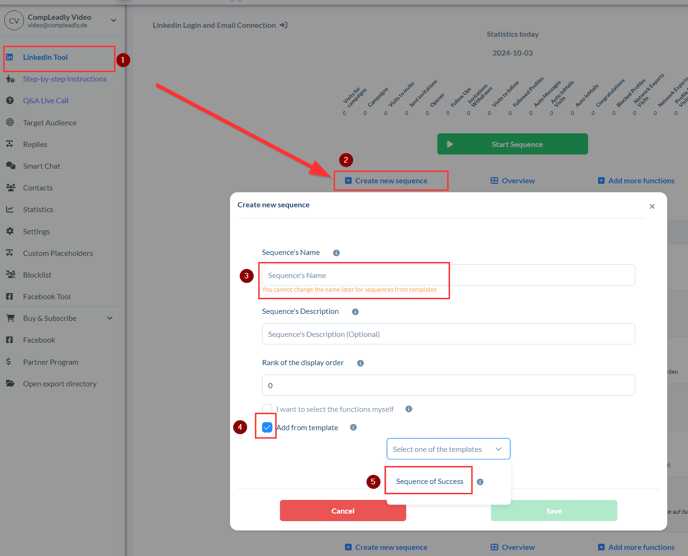
- Click on the LinkedIn Tool (1) in the menu on the left side.
- Press Create New Sequence (2).
- Enter a suitable name for the sequence in the Sequence Name field (3).
Note that you will not be able to change this later. - Add from template (4)
- Select the Sequence of Success option (5).
- Finally, click the green Save button to create the sequence.
Step 2: Insert target group from LinkedIn into the sequence
- Open the Sales Navigator or LinkedIn
- Set up the filters to suit your target group
- Copy the link (URL)
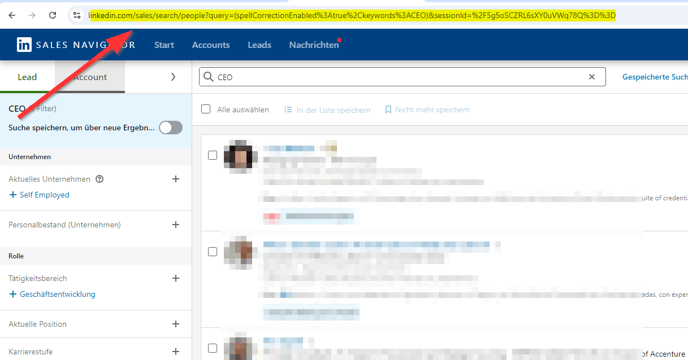
4. Paste the link into CompLeadly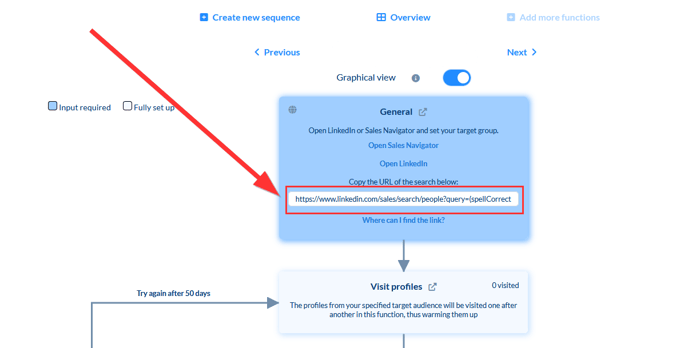
Step 3: Individualize messages
It is important that you customize the texts in the messages to add your personal touch. CompLeadly provides ready-made templates, but it is recommended to modify them to ensure uniqueness. The texts should be customized for the
- welcome message
- the pitch message
- the follow-up messages.
For the follow-up messages, it is advisable to add more messages to increase the likelihood of a response.
More on this in this article: ⤴Why to follow up
Step 4: Sequence execution and support
CompLeadly allows you to schedule the execution of your sequence. This can be particularly useful if you use your computer at certain times.
CompLeadly also offers daily Q&A Live Calls (in the menu left) and support via the button in the top right corner if you have any questions or need help with setup.
Additional Opportunities for Follow-Ups.
After the follow-ups, there’s more:
FAQ
Is it possible to modify the Success Sequence so that only profiles are approached with a connection request to which I already follow?
For this, deactivate the “Visit and Follow” function. You will not need it then, as you are already following.
With the Connecting function, you can use one of these target groups (video).