The setting is available, among others, for:
-
InMails
-
Auto-Messages
-
Campaign Messages
There are two different types of checks.
1. Enabled – check only within this function
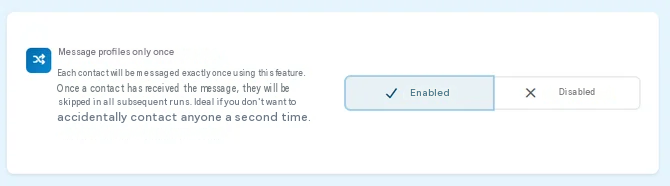
“Enabled” is the default setting.
CompLeadly only checks the specific messaging function that is currently being executed.
If a contact has already received a message via this function, they will be skipped during another run of this function.
Other messaging functions are not taken into account.
Example
You have set up two different Campaign Messages:
Campaign Message A
Max Mustermann has already been contacted.
If Campaign Message A finds Max again, he will be skipped.
Campaign Message B
If Campaign Message B finds Max Mustermann, he can be contacted again there.
With “Enabled”, the check only applies within the respective function.
2. Disabled – check across functions with a sending period
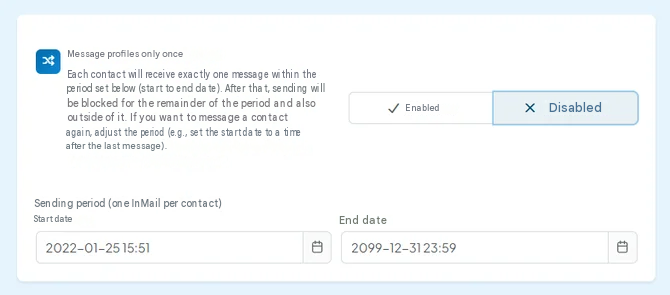
If you select “Disabled”, a sending period with a start date and end date will also appear.
CompLeadly then no longer checks only the current function.
Instead, it checks whether the contact has already been contacted via another messaging function of the same function type within the specified period.
If a corresponding message has already been sent, the contact will be skipped.
Example
You have two Campaign Messages:
-
Campaign Message A
-
Campaign Message B
The sending period is:
01.01.2026 to 31.12.2026
Max Mustermann was contacted via Campaign Message A on 02/10/2026.
Campaign Message B finds Max on 03/20/2026.
Since a Campaign Message has already been sent to Max within the specified period, he will be skipped in Campaign Message B.
The check therefore takes place across multiple functions of the same function type.
Which function types are compared with each other?
The check is performed within the respective message type.
Examples:
-
Campaign Messages are compared with other Campaign Messages.
-
Auto-Messages are compared with other Auto-Messages.
-
InMails are compared with other InMails.
A Campaign Message therefore does not automatically result in a later InMail being skipped.
The two settings in comparison
| Setting | What is checked? | Sending period |
| Enabled | Only the current specific function | Not required |
| Disabled | All functions of the same function type | Start and end date required |
When should you use “Enabled”?
Use “Enabled” if a contact should only be contacted once within a specific campaign or function.
Other campaigns may continue to contact the same contact.
When should you use “Disabled” with a sending period?
Use this setting if you want to prevent a contact from being contacted via multiple functions of the same type within a specific period.
This is suitable, for example, if you use multiple campaigns in parallel and do not want contacts to be reached multiple times via Campaign Messages.
Contacting a contact again later
If a contact should be able to be contacted again after a certain period of time, you can adjust the sending period accordingly.
If their previous message is outside the specified period, it will not be taken into account during the check.
Important
“Disabled” does not mean that the check for duplicate messages is completely turned off.
With this selection, you switch from checking the individual function to a time-period-based check across multiple functions of the same type.