What does this message mean?
When CompLeadly displays the message “A message has already been sent to this contact with this function” for a contact, it means: This contact has already received a message within the function’s configured date range. The system therefore automatically skips them so that no duplicate messages are sent.
This is not an error – it is the protection function that ensures each contact is only messaged once per date range.
How to diagnose this yourself – step by step
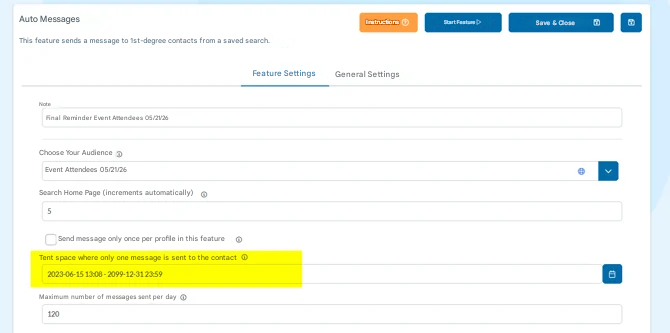
Step 1: Check the function’s date range
Open the affected function (e.g. Auto Messages) and check which date range is set. Take note of the start and end date.
Example: Date range 01/01/2025 – 12/31/2099 → the system checks whether a message has already been sent via this exact function during this period.
Step 2: Look up the contact activity under “Leads”
-
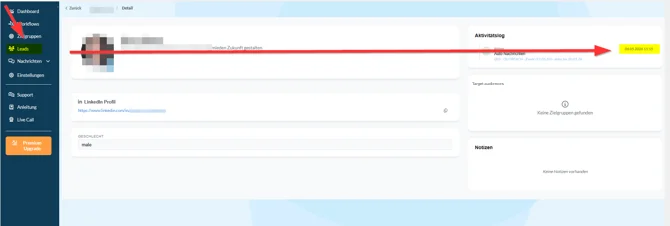
Go to Leads → Contact in CompLeadly
-
Search for the contact that was skipped (e.g. by name or profile URL)
-
Open the contact and look at the activity history
-
Check whether an auto message is listed there within the date range from Step 1.
Step 3: Evaluate the result
- Activity is within the date range → The contact was correctly skipped. The function is working as expected.
- No activity visible or the date is outside the range → Please contact support with the name of the contact and a screenshot of the function.
What should you do if the contact should be messaged again?
If you want a contact to receive another message, you can set the function’s start date to a date that is after the last message date. From this new start date, the time period applies again – and the contact will be included again during the next run.
Note: This resets the time period for all contacts in this function, not just for one individual contact.