Behind this is the message: “LinkedIn only shows 1000 results. All others are hidden. Please add more filters to get fewer than 1000 results.” This is not an error, but a technical characteristic of LinkedIn. Here you will learn how this limit comes about and what you can do to reach all relevant contacts.
1. Where the 1,000-result limit comes from
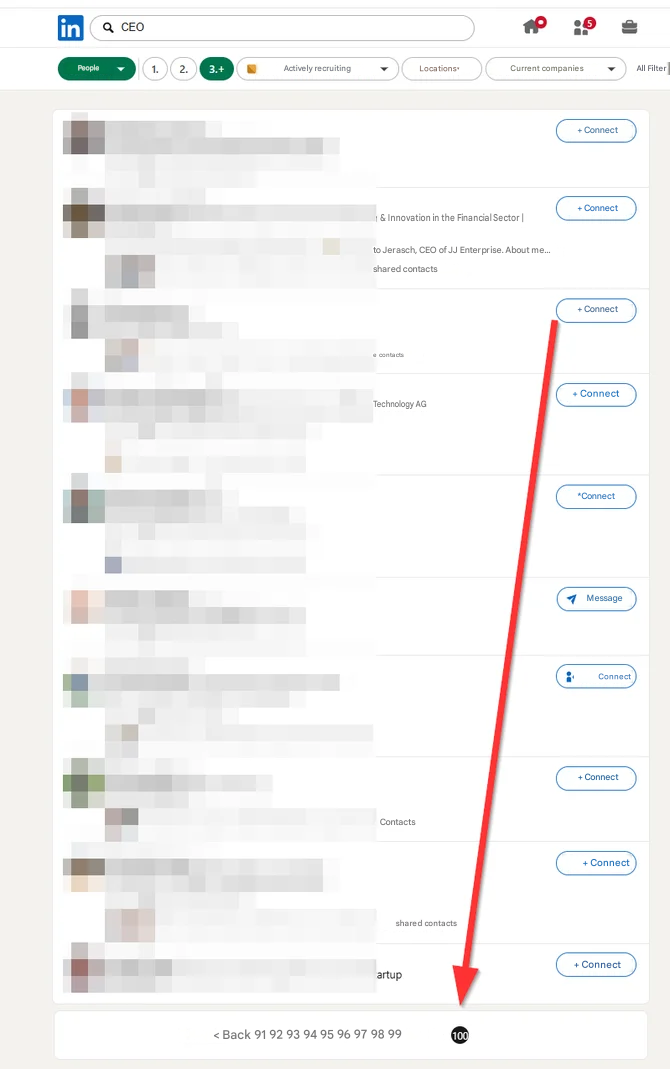
The number results directly from the structure of LinkedIn search. LinkedIn displays a maximum of 100 result pages in a normal search, and each page contains 10 people. This creates the fixed upper limit:
100 pages × 10 results per page = 1,000 results.
Everything beyond these 1,000 profiles is simply no longer provided by LinkedIn. The people do exist, but they can no longer be reached via pagination.
2. What the notice specifically means
If “> 1000” is displayed to you, it only means: Your search matches more than 1,000 suitable profiles. However, LinkedIn can deliver a maximum of 1,000 of them to you. The rest remains hidden. So your search is not too narrow, but too broad, and some of your potential contacts are not displayed at all.
Important: It is not a restriction and not a problem with your account. It is simply a notice that you can narrow down your search more precisely in order to really capture all relevant profiles.
3. How to get fewer than 1,000 results
The solution is exactly what the notice suggests: Add additional filters until your result list falls below 1,000. As soon as you do this, the warning disappears, and you work with a complete, gap-free list.
Well-suited filters for narrowing things down include, for example, location or region, industry, current company, or individual keywords in the position. So instead of searching for all “CEO” worldwide, you narrow it down to a specific region and a specific industry, for example. This keeps your target group precise, and you no longer lose contacts due to hidden profiles.
4. More reach with Sales Navigator
If your target group is naturally very large and is difficult to narrow down further, it is worth taking a look at Sales Navigator. A higher upper limit applies there: Sales Navigator shows 25 people on 100 pages, meaning up to 2,500 results per search in total.
In addition, Sales Navigator gives you significantly more search criteria with which you can describe your target group more precisely. In many cases, this makes it easier to stay below the respective limit while also addressing the right people in a more targeted way.
5. The most important things in brief
The limit of 1,000 results in the normal LinkedIn search results from 100 pages with 10 profiles each and cannot be bypassed. The notice “> 1000” means that your search has too many results and some of them are hidden. The solution is always the same: Add more filters until you get below 1,000 results so that no contacts are lost. If you need more room, Sales Navigator offers a good alternative with up to 2,500 results and more precise filters.