In a custom Smart Comment AI prompt, specify whether to skip a particular language, target audience, or topic.
Simply add your prompt:"Skip posts if XXX"
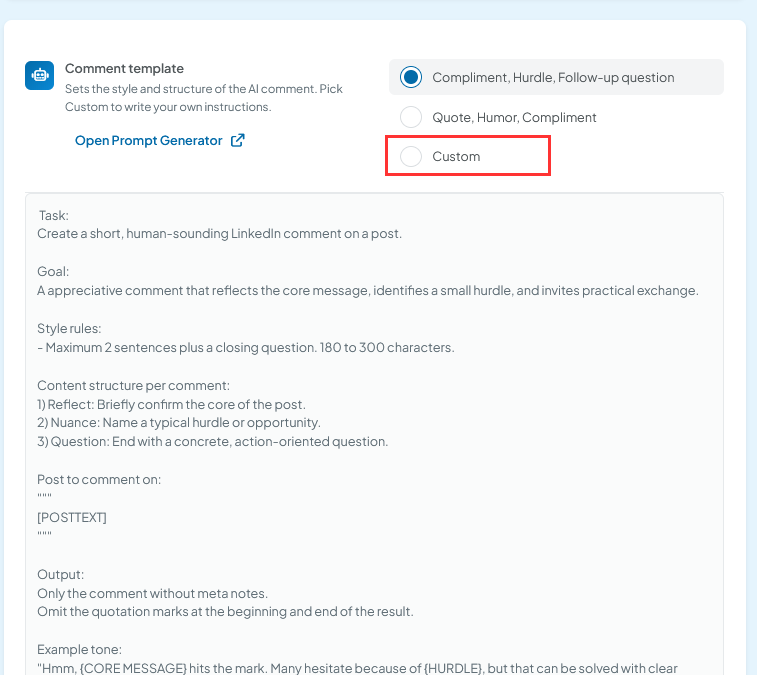
The following post still works but is now obsolete because you can specify directly in the SmartComment prompt whether CompLeadly should skip certain posts, languages, or target audiences.
In this article, you will learn how to skip such posts using keywords, manual review, or additional AI-based control.
Table of Contents
- Filter posts using keywords
- Review comments before publishing
- Detect unwanted topics through the prompt
- Mark posts with a placeholder
- Automatic processing via MCP
- Recommended approach
Filter posts using keywords
In the Smart Comment AI settings, you can define which keywords must appear in a post and which keywords should be excluded.
If a post contains an excluded keyword, it will be skipped. For example, you can specify terms that indicate political, medical, or other content that is not suitable for you.
You can also define keywords that must be present in a post. This allows Smart Comment AI to focus on content that matches your offering and target audience.
Keep in mind that broad topics often consist of many different terms, phrasings, and contexts. Therefore, a single excluded keyword will not automatically identify every post related to that topic.
Review comments before publishing
Disable the “Send without review” setting if you want to review every generated comment before it is published.
The generated comments will first be saved in the Smart Comment AI table. There, you can review the content and delete individual entries before a comment is published on LinkedIn.
This setting is especially useful if:
- you have just set up Smart Comment AI,
- you are testing a new prompt,
- you want to avoid specific topics,
- you want to approve comments before they are published.
Detect unwanted topics through the prompt
You can write your prompt so that the AI not only generates a comment but first evaluates whether a post matches your requirements.
Define as specifically as possible:
- which topics fit your positioning,
- which topics should not receive a comment,
- which types of posts should be skipped,
- which clear result the AI should return for unsuitable posts.
A possible instruction within the prompt is:
Only generate a comment if the post matches my defined topics and positioning. For unsuitable, political, medical, or sensitive topics, return only “NO_COMMENT”.
The term “NO_COMMENT” serves as a clear identifier. Without additional processing, this identifier will initially appear as the generated comment in the Smart Comment AI table.
Mark posts with a placeholder
A predefined placeholder makes subsequent review and processing easier.
Always use exactly the same wording, for example:
NO_COMMENT
This allows you to quickly identify the relevant entries and delete them manually.
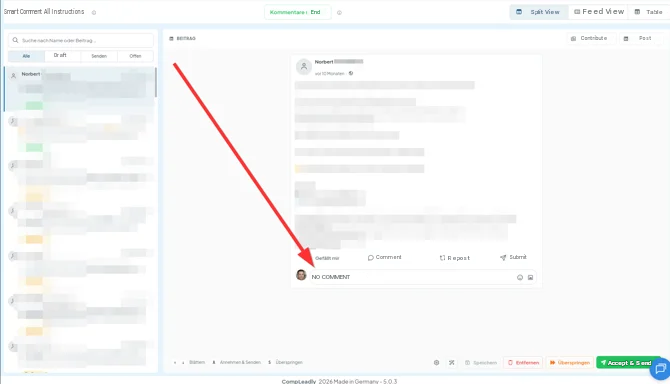
At the same time, a connected AI can specifically search for this value and automatically skip the corresponding posts. (Connect CompLeadly with your own AI)
Do not use varying placeholders such as “Do not comment”, “No meaningful comment”, or “Skip post”. A consistent value can be processed much more reliably.
If you have connected your own AI to CompLeadly via MCP, you can automatically process the marked entries.
The AI can regularly check which entries contain the comment “NO_COMMENT”. It can then change the status to “Skip” or delete the corresponding entry.
Example of such an instruction:
Check all entries in Smart Comment AI where the comment is set to “NO_COMMENT”. Change the status of these entries to “Skip” / delete the corresponding entry.
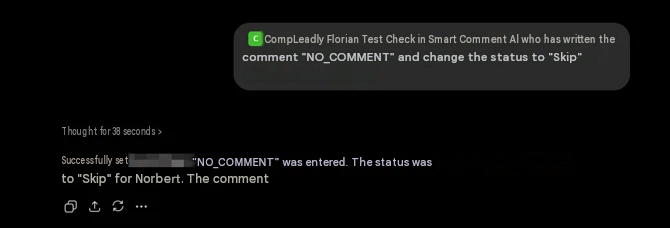
This results in the following workflow:
- Smart Comment AI analyzes the post.
- The prompt detects an unwanted topic.
- The AI returns “NO_COMMENT”.
- Your connected AI finds the marked entry.
- The post is skipped or removed from the table.
A fully automated content evaluation of all profiles and posts requires more AI processing than a simple keyword filter. Connecting your own AI allows you to implement this advanced level of control according to your individual requirements.