Requirements
-
You must have an active Sales Navigator subscription
-
You and the recipient must be 1st-degree connections (connected on LinkedIn)
-
The recipient must not currently use LinkedIn Premium or Sales Navigator
-
The recipient must not have used a Sales Navigator or Premium in the last 12 months
Step-by-Step Guide
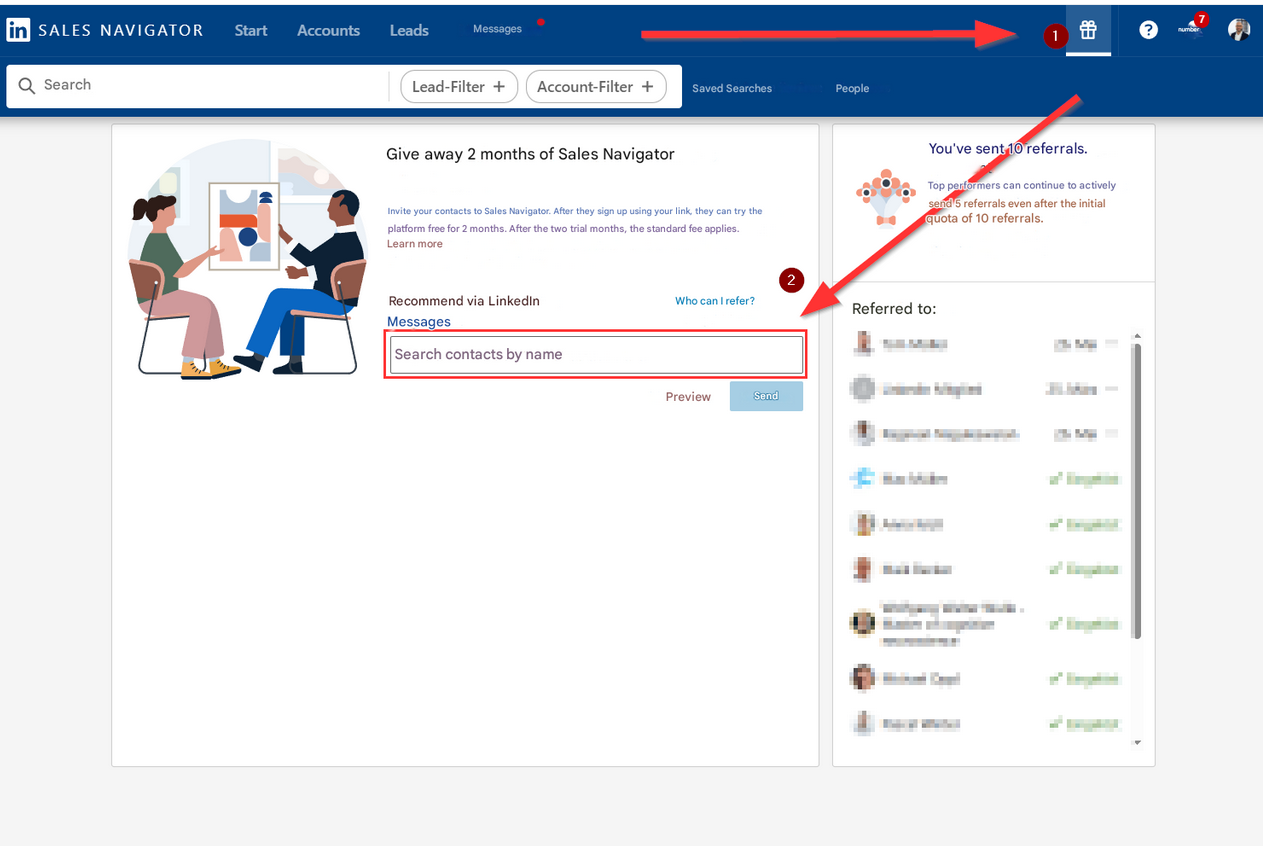
1. Click the gift icon
In the top right menu bar, you'll see a gift icon 🎁 (marked with a red arrow and the number "1"). Click it to access the referral page.
2. Search for a contact
In the middle section, you'll see the heading:
"Give 2 Months of Sales Navigator"
Below that, there's a search field (highlighted in red, marked with an arrow and the number "2"):
➤ Enter the name of a LinkedIn contact you’d like to give Sales Navigator access to.
3. Your contact receives a message
They’ll get a message with a link to activate the 2-month Sales Navigator trial.