⚠️ By using the collective invoice and user management feature, you agree to the terms of the supplementary agreement for user management.
Step 1: Access User Management
-
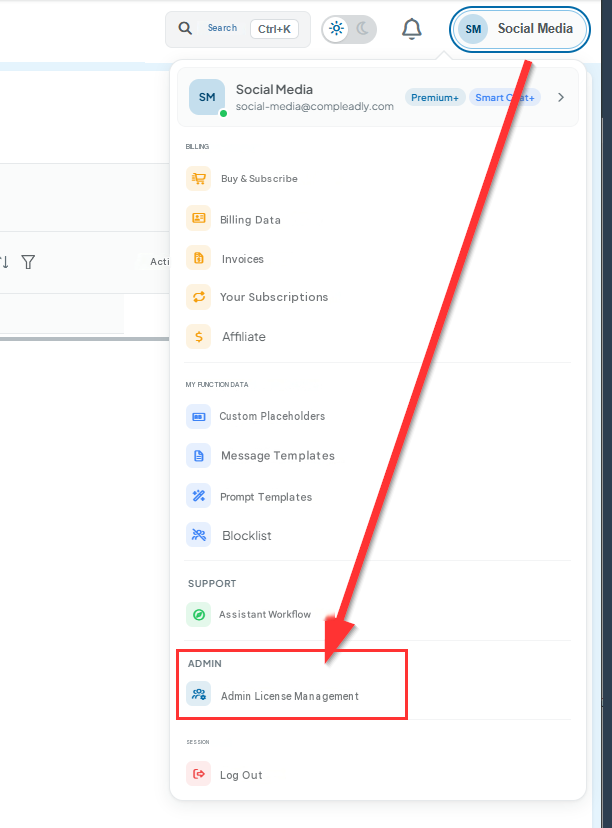
Go to the top-right corner, click on your name, and then click "Admin License Management."
-
Note: If you don't see this option in the menu, we first need to enable User Management for your account. Please contact support@compleadly.de.
-
If needed, you can register the new account here: https://compleadly.web.app/#/auth/signup
Step 2: Add a New User
-
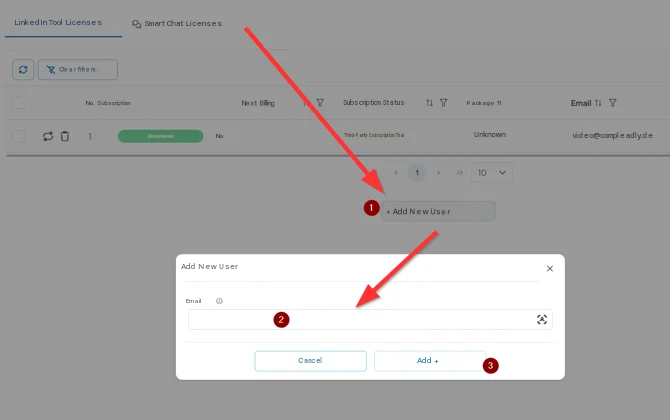
In User Management, you will see an empty table. Click on the "Add New User" option.
Note: Make sure that the email address you want to add is already registered with CompLeadly. If not, the person can register using this link: https://compleadly.web.app/#/auth/signup
Step 3: Enter the Email Address
-
After clicking "Add New User," enter the email address of the already registered user.
Note: Personal information such as the user's first and last name will only become visible after the user has been activated, for data protection reasons.
Step 4: Select the Subscription Status
-
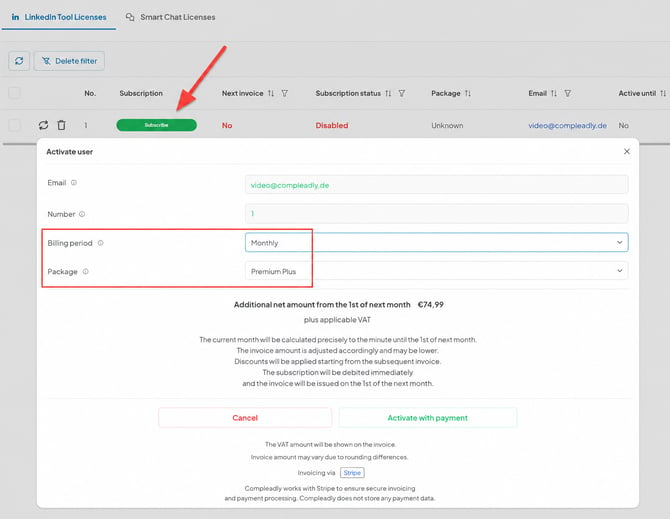
If the user's subscription status is "Disabled," click the "Subscribe" button.
-
⚠️ Note: If the user's subscription status is "Enabled" or "Third-Party Subscription/Trial," they are either still in the trial period or have already purchased their own subscription. In the latter case, you may end up paying twice. Please refer to our FAQ for the next steps ➔ FAQ.
-
When subscribing, you can choose between annual and monthly billing, as well as between the available plans.
-
After making your selection, click "Activate Paid Subscription." This will add the user to your invoice.
Step 5: Manage the Subscription
-
Once you have activated the subscription for the user, the button will change from "Subscribe" to "Cancel" or "Upgrade."
Note: If you selected the Basic plan, you can upgrade it to Premium at a later time.
Step 6: Support
-
If you have any questions or need assistance, you can contact us at any time using the Support button.
Note: The user will not see their own subscription under "My Subscriptions" because they are included in your collective invoice. However, they will have access to the features included in the selected subscription.
FAQ - Frequently Asked Questions
I or someone else in the list is already activated
If you want to subscribe yourself but your status is still "Enabled," you may still be in the trial period or already have an active subscription.
If you already have a subscription, you must cancel it first. To do this, click on your name in the top-right corner of the corresponding CompLeadly profile and then select Subscription. There you can also see the subscription end date or the date of the next payment.
You should only subscribe yourself through User Management after that date. Otherwise, you may end up paying twice.
Annual subscriptions
Annual subscriptions are not recurring subscriptions. They are one-time payments that cover a period of 1 year. After the year has ended, the subscription must be purchased again for another year.