Prerequisite
- There must be no active package in LinkedIn. This means not just canceled, but truly expired/deactivated. (What is lost when canceling?)
- A Visa or Mastercard must be on file (unfortunately, AMEX, Paypal, and all cards issued in the USA do not work).
1. On LinkedIn (Video Tutorial)
-
Please use the following link to enter your credit card details (VISA or Mastercard) and sales tax ID in LinkedIn.
⤴https://www.linkedin.com/manage/purchases-payments/transactionsUnfortunately, other payment methods such as AMEX, PayPal, SEPA or debit card will not work with the offer.
If it is not possible for you to enter a payment method in step 1.a., you will unfortunately have to take out the monthly package or the trial phase of the Sales Navigator / Premium Business for one month to be able to enter your payment details. ➔ Then cancel immediately!
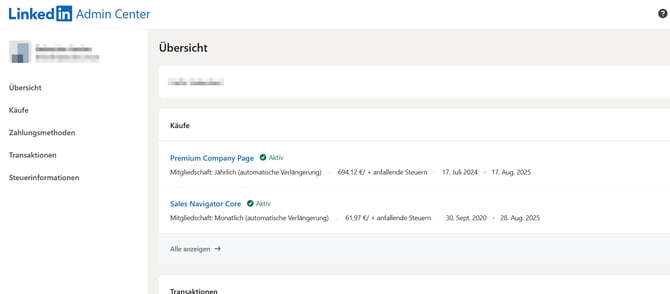
Book an appointment 1 day after the end of the term. - Please check that you do not have a LinkedIn package, i.e. you must be a free LinkedIn customer. This means that you must not have an active package:
https://www.linkedin.com/manage/purchases-payments- Please send us a picture of the overview to support@compleadly.de
3. Please change your LinkedIn access password by the time we talk to
12345Hallo12345!
You can change your LinkedIn password here.
⤴https://www.linkedin.com/mypreferences/d/change-password
After the conversation, you can change it again immediately.
2. In CompLeadly
Please check in CompLeadly if the deposited payment data is correct and make sure that your account is covered for the one-time service fee.
3. Phone appointment
Please book a phone appointment with us here. If the credit card payment cannot be released by you, the credit card holder must be available.
➔ To the calendar
The duration of the call is about 5 min.
We will then call you when we log into your LinkedIn account to complete the Sales Navigator at the discounted rate.
You can find the price of LinkedIn and the one-time service fee on the left in CompLeadly under buy&subscribe ➔ Sales Navigator Deals.
FAQ – Frequently Asked Questions
Which LinkedIn package will I receive?
Either "Sales Navigator Core" or "Premium Business."
What happens during the phone call?
There are two key pieces of information we will need in real-time:
- LinkedIn will send a verification email after our profile's login. This email contains a code, which you provide to us.
- At the end of the purchase process in LinkedIn, the purchase confirmation must be approved via your banking app or TAN.
Will the membership renew next year under the same conditions?
Yes, the membership will renew under the same conditions. The only exception is that our one-time service fee will no longer apply.
Do the conditions change with CompLeadly?
The LinkedIn plan is independent of CompLeadly and remains unchanged, even if you cancel CompLeadly.
Am I still free to cancel the contract?
All LinkedIn plans are, as of May 2023, cancellable at any time at the end of the term.
Learn more: ⤴LinkedIn Help
Where can I enter the billing address?
⤴How can I save the billing address on LinkedIn?
Dislaimer
This article is for informational purposes only and does not represent a feature of CompLeadly. CompLeadly assumes no liability for the content or its accuracy. The described offering is not part of CompLeadly and is provided without any guarantees. CompLeadly solely provides a recommendation. The respective providers are responsible for delivering the services.